- 版权类型
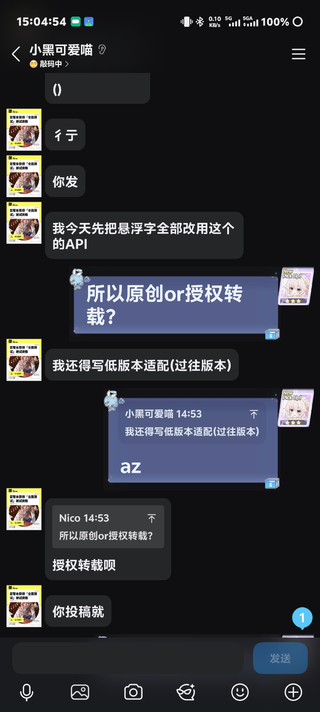
- 授权转载
- 语言支持
- 多语言
- 前置组件
- LeviLamina: https://github.com/LiteLDev/LeviLamina
LegacyScriptEngine:https://github.com/LiteLDev/LegacyScriptEngine
LegacyRemoteCall:
DebugShape:https://github.com/IceBlcokMC/DebugShape
- 适配版本(基岩)
- 最新版本
[MD]# DebugShape LSE Export
将 DebugShape 插件的调试形状功能导出给 LSE (Legacy Script Engine) 脚本插件使用。
## 依赖
- LeviLamina
- DebugShape
- LegacyRemoteCall
- LegacyScriptEngine
## LSE 调用方法
### 导入函数
```javascript
// 创建形状
const createText = ll.import("DebugShape", "createText");
const createLine = ll.import("DebugShape", "createLine");
const createBox = ll.import("DebugShape", "createBox");
const createCircle = ll.import("DebugShape", "createCircle");
const createSphere = ll.import("DebugShape", "createSphere");
const createArrow = ll.import("DebugShape", "createArrow");
// 属性设置
const setText = ll.import("DebugShape", "setText");
const setLocation = ll.import("DebugShape", "setLocation");
const setColor = ll.import("DebugShape", "setColor");
const setScale = ll.import("DebugShape", "setScale");
// 属性获取
const getText = ll.import("DebugShape", "getText");
const getLocation = ll.import("DebugShape", "getLocation");
const getColor = ll.import("DebugShape", "getColor");
const getShapeType = ll.import("DebugShape", "getShapeType");
// 显示控制
const draw = ll.import("DebugShape", "draw");
const drawToPlayer = ll.import("DebugShape", "drawToPlayer");
const drawToDimension = ll.import("DebugShape", "drawToDimension");
const remove = ll.import("DebugShape", "remove");
const update = ll.import("DebugShape", "update");
// 生命周期
const destroy = ll.import("DebugShape", "destroy");
const destroyAll = ll.import("DebugShape", "destroyAll");
```
## API 参考
### 创建形状
| 函数 | 参数 | 返回值 | 说明 |
|------|------|--------|------|
| `createText(x, y, z, text)` | x, y, z: float, text: string | int64 (ShapeID) | 创建悬浮字 |
| `createLine(x1, y1, z1, x2, y2, z2)` | 起点和终点坐标 | int64 (ShapeID) | 创建线段 |
| `createBox(x1, y1, z1, x2, y2, z2)` | 两个角点坐标 | int64 (ShapeID) | 创建方框 |
| `createCircle(x, y, z, scale)` | 中心坐标和缩放 | int64 (ShapeID) | 创建圆形 |
| `createSphere(x, y, z, scale)` | 中心坐标和缩放 | int64 (ShapeID) | 创建球体 |
| `createArrow(x1, y1, z1, x2, y2, z2)` | 起点和终点坐标 | int64 (ShapeID) | 创建箭头 |
### 属性操作
| 函数 | 参数 | 返回值 | 说明 |
|------|------|--------|------|
| `setText(id, text)` | id: int64, text: string | bool | 设置文本内容(仅Text类型) |
| `getText(id)` | id: int64 | string | 获取文本内容 |
| `setLocation(id, x, y, z)` | id: int64, x, y, z: float | bool | 设置位置 |
| `getLocation(id)` | id: int64 | [x, y, z] | 获取位置数组 |
| `setColor(id, r, g, b, a)` | id: int64, RGBA: float (0.0-1.0) | bool | 设置颜色 |
| `getColor(id)` | id: int64 | [r, g, b, a] | 获取颜色数组 |
| `setScale(id, scale)` | id: int64, scale: float | bool | 设置缩放 |
| `getShapeType(id)` | id: int64 | int | 获取形状类型 |
### 形状类型枚举
| 类型 | 值 |
|------|-----|
| Line | 0 |
| Box | 1 |
| Sphere | 2 |
| Circle | 3 |
| Text | 4 |
| Arrow | 5 |
### 显示控制
| 函数 | 参数 | 返回值 | 说明 |
|------|------|--------|------|
| `draw(id)` | id: int64 | bool | 发送给所有客户端 |
| `drawToPlayer(id, playerName)` | id: int64, playerName: string | bool | 发送给指定玩家 |
| `drawToDimension(id, dimId)` | id: int64, dimId: int | bool | 发送给指定维度 |
| `remove(id)` | id: int64 | bool | 从客户端移除显示 |
| `update(id)` | id: int64 | bool | 更新显示(移除后重绘) |
### 生命周期
| 函数 | 参数 | 返回值 | 说明 |
|------|------|--------|------|
| `destroy(id)` | id: int64 | bool | 销毁形状并释放资源 |
| `destroyAll()` | 无 | void | 销毁所有形状 |
## 使用示例
### 基础示例 - 创建悬浮字
```javascript
const createText = ll.import("DebugShape", "createText");
const setColor = ll.import("DebugShape", "setColor");
const draw = ll.import("DebugShape", "draw");
const destroy = ll.import("DebugShape", "destroy");
// 在坐标 (100, 65, 100) 创建悬浮字
const textId = createText(100, 65, 100, "Hello World!");
// 设置为红色
setColor(textId, 1.0, 0.0, 0.0, 1.0);
// 发送给所有玩家
draw(textId);
// 10秒后销毁
setTimeout(() => {
destroy(textId);
}, 10000);
```
### 绘制方框
```javascript
const createBox = ll.import("DebugShape", "createBox");
const setColor = ll.import("DebugShape", "setColor");
const draw = ll.import("DebugShape", "draw");
// 创建一个 10x10x10 的方框
const boxId = createBox(0, 60, 0, 10, 70, 10);
// 设置为半透明绿色
setColor(boxId, 0.0, 1.0, 0.0, 0.5);
// 显示
draw(boxId);
```
### 绘制箭头指向
```javascript
const createArrow = ll.import("DebugShape", "createArrow");
const setColor = ll.import("DebugShape", "setColor");
const draw = ll.import("DebugShape", "draw");
// 从 (0, 65, 0) 指向 (10, 70, 10) 的箭头
const arrowId = createArrow(0, 65, 0, 10, 70, 10);
// 设置为蓝色
setColor(arrowId, 0.0, 0.0, 1.0, 1.0);
// 显示
draw(arrowId);
```
### 只对特定玩家显示
```javascript
const createText = ll.import("DebugShape", "createText");
const drawToPlayer = ll.import("DebugShape", "drawToPlayer");
const textId = createText(100, 65, 100, "只有你能看到");
// 只发送给名为 "Steve" 的玩家
drawToPlayer(textId, "Steve");
```
### 动态更新位置
```javascript
const createText = ll.import("DebugShape", "createText");
const setLocation = ll.import("DebugShape", "setLocation");
const draw = ll.import("DebugShape", "draw");
const update = ll.import("DebugShape", "update");
const textId = createText(0, 65, 0, "移动的文字");
draw(textId);
let x = 0;
setInterval(() => {
x += 1;
setLocation(textId, x, 65, 0);
update(textId); // 更新显示
}, 1000);
```
## 注意事项
1. 创建形状后需要调用 `draw()` 才能在客户端显示
2. 修改属性后需要调用 `update()` 来刷新显示
3. 不再使用的形状应调用 `destroy()` 释放资源
4. `setText()` 和 `getText()` 仅对 Text 类型形状有效
5. 颜色值范围为 0.0 到 1.0
6. 返回 -1 的 ShapeID 表示创建失败
## 授权证明
[ATTACH type="full" size="1080x2400"]126050[/ATTACH]
[/MD]



![智能手机插件 [仅适用于1.19]](/data/resource_icons/3/3311.jpg?1741369737)


