
- 注册
- 2020/03/03
- 消息
- 313
- 金粒
- 1,513.55金粒








系统:ubuntu 22
指令集:amd64
看看效果:https://pan.vusv.cn
如果你不知道你的指令集可以看:https://docs.openfrp.net/use/#linux
有详细说明。
openfrp相比樱花frp,有更多的免费隧道数量和更合理的 付费隧道数量 使用策略。因此本文只提供openfrp的相关实现。
首先我们在 openfrp 创建好 https 穿透,然后下载程序。
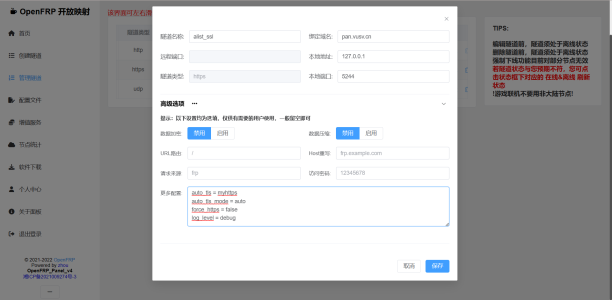
更多配置:
openfrp客户端下载:https://www.openfrp.net/home/download
我们通过 freessl.cn 的 acme 实现 ssl证书 的自动化续签。
具体教程:https://blog.freessl.cn/acme-quick-start/
我注意到
似乎可以自动重启应用。
这里划重点,后面我们要用到。
于是我们可以联想到 linux 系统中的
我们首先创建
再修改它的内容为:
请注意,ExecStart值的
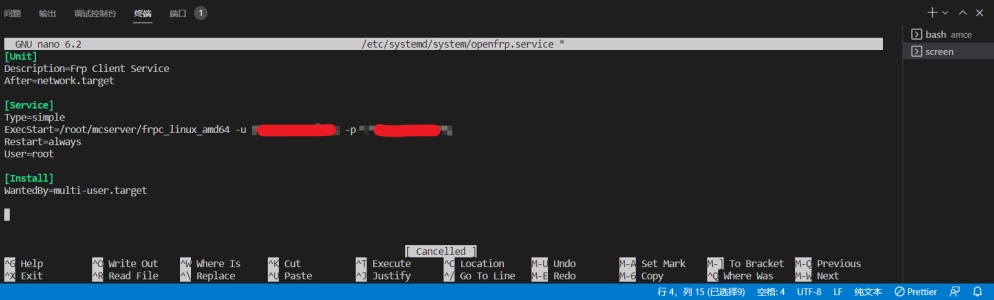
按 Ctrl+X 退出,会提示是否保存

输入
使用命令参考
加载服务:
启动服务:
开机自启动服务:
检查服务状态:
让我们回到 amce配置中
可以使用
来添加自动更新服务。
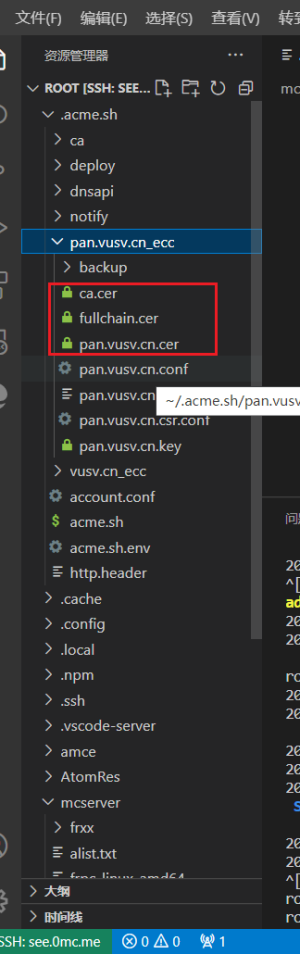
如果你执行失败并且没有.cer文件,可能是因为你没有签发证书
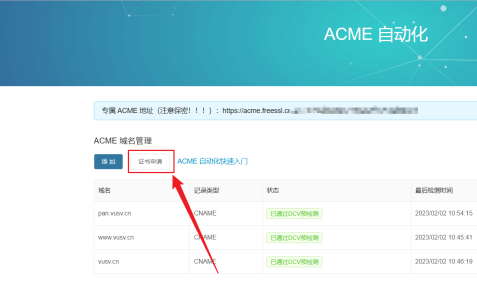
你需要在ACME域名管理:https://freessl.cn/acme-deploy
处签发证书
最后
使用
指令集:amd64
看看效果:https://pan.vusv.cn
如果你不知道你的指令集可以看:https://docs.openfrp.net/use/#linux
有详细说明。
openfrp相比樱花frp,有更多的免费隧道数量和更合理的 付费隧道数量 使用策略。因此本文只提供openfrp的相关实现。
首先我们在 openfrp 创建好 https 穿透,然后下载程序。
更多配置:
代码:
auto_tls = myhttps
auto_tls_mode = auto
force_https = false
log_level = debugopenfrp客户端下载:https://www.openfrp.net/home/download
我们通过 freessl.cn 的 acme 实现 ssl证书 的自动化续签。
具体教程:https://blog.freessl.cn/acme-quick-start/
我注意到
代码:
acme.sh --install-cert -d example.com \
--cert-file      /path/to/certfile/in/apache/cert.pem  \
--key-file       /path/to/keyfile/in/apache/key.pem  \
--fullchain-file /path/to/fullchain/certfile/apache/fullchain.pem \
--reloadcmd     "service apache2 force-reload"
似乎可以自动重启应用。
这里划重点,后面我们要用到。
| 本部分用到的 用户数据 | |
|---|---|
| 8xxxxx6e9dxxxxx | openfrp的用户令牌 |
| 91575,91583,91860 | 启动91575和91583隧道 |
| /root/mcserver/frpc_linux_amd64 | 可执行文件路径 |
于是我们可以联想到 linux 系统中的
systemctl 命令我们首先创建
代码:
sudo nano /etc/systemd/system/openfrp.service再修改它的内容为:
请注意,ExecStart值的
8xxxxx6e9dxxxxx和91575,91583分别是你的 usertoken 和你的 隧道id
代码:
[Unit]
Description=OpenFrp Client Service
After=network.target

[Service]
Type=simple
ExecStart=/root/mcserver/frpc_linux_amd64 -u 8xxxxx6e9dxxxxx -p 91575,91583
Restart=always
User=root
WorkingDirectory=/root/mcserver/

[Install]
WantedBy=multi-user.target
按 Ctrl+X 退出,会提示是否保存
输入
Y,然后Enter回车。即可保存并退出。使用命令参考
加载服务:
代码:
sudo systemctl daemon-reload
代码:
sudo systemctl start openfrp
代码:
sudo systemctl enable openfrp
代码:
sudo systemctl status openfrp让我们回到 amce配置中
可以使用
代码:
acme.sh --install-cert -d pan.vusv.cn --fullchain-file /root/mcserver/myhttps.crt --key-file /root/mcserver/myhttps.key --reloadcmd "systemctl restart openfrp"如果你执行失败并且没有.cer文件,可能是因为你没有签发证书
你需要在ACME域名管理:https://freessl.cn/acme-deploy
处签发证书
最后
使用
sudo systemctl start openfrp启动服务。
最后编辑:


![BuilderWand —— 让玩家用建筑法杖进行高效的建筑![全版本]](/data/resource_icons/7/7617.jpg?1710497104)


