
- 注册
- 2021/08/13
- 消息
- 475
- 金粒
- 2,400.56金粒




目前搜到的相关议题:

MB 的资源列表搜索、筛选功能不太好用,只能通过点击“筛选”按钮打开一个小小的浮窗面板的方式来进行筛选,实际是不太便于操作的。
也不是说不能用,就是用起来很蹩脚,很不现代。能将选项做成多选框就再好不过了,目前我询问 AI 得到最好的方案是,隐藏原有的 select 元素,用 js 在它下面生成
补一下 DeepSeek 写的油猴脚本,可以将论坛里的
意见建议 主题【服务器版块优化求求】中的帖子
2025/12/13 20:32
还有服务器插件那一块,更是基本没有分类,连是否是付费或者是免费插件的分类都没有,更别提具体的插件内容了(安全插件,娱乐插件,乃至前置插件这样的分类)
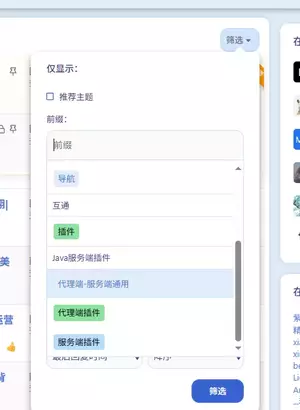
MB 的资源列表搜索、筛选功能不太好用,只能通过点击“筛选”按钮打开一个小小的浮窗面板的方式来进行筛选,实际是不太便于操作的。
- 建议将筛选改成竖向可折叠/展开的搜索面板,除了在里面加上原先“筛选”浮窗面板中的内容以外,还需要把资源搜索功能也加进来。
- 是搜索后直接在资源列表中显示搜索结果,还是转跳到高级搜索页面,看怎么做比较方便好用了。目前在资源列表里只能通过 header 右上角的搜索按钮来搜索,还要将默认为“任意位置”的下拉框调整到“资源”才能正确搜索,总归有点怪怪的。人机交互体验不好。
- 筛选功能也有点问题,目前无法有效筛选以下三种资源获取方式:免费、金粒购买、站外购买。筛选购买方式为付费,金粒购买和站外购买会合在一起;筛选只显示“付费”标签,因为版规并没有约束付费标签的具体用法,导致有些人发布资源的时候,金粒购买也加付费标签。
- 还是筛选功能的问题,发帖的时候让作者选择了语言、游戏版本、模组加载器、支持服务端,却没有任何一个相关的筛选选项可以去使用,高级搜索也没有这样的筛选。感觉要实现这个功能,要按不同的板块去做不同的额外筛选选项才行,现在的筛选太过于“通用”了。
也不是说不能用,就是用起来很蹩脚,很不现代。能将选项做成多选框就再好不过了,目前我询问 AI 得到最好的方案是,隐藏原有的 select 元素,用 js 在它下面生成
input[type=checkbox] 并且绑定到相应选项,兼容性比较好,做起来也更容易。补一下 DeepSeek 写的油猴脚本,可以将论坛里的
select[multiple] 隐藏,在它后面生成多选框,跟对应的选项同步
JavaScript:
// ==UserScript==
// @name         Select Multiple → 多选框分组
// @namespace    https://www.minebbs.com/
// @version      1.0
// @description  自动将 select[multiple] 转换成带分组的复选框列表,保留原有提交格式
// @match        *://www.minebbs.com/*
// @grant        none
// @run-at       document-idle
// ==/UserScript==

(function () {
  'use strict';

  const MARK = '__converted_to_checkboxes__';

  const style = document.createElement('style');
  style.textContent = `
    /* 外层容器:不滚动,只负责宽度/外边距 */
    .smc-wrapper {
      font-size: 13px;
      line-height: 1.7;
      color: inherit;
      background: transparent;
      box-sizing: border-box;
      display: flex;
      flex-direction: column;
    }

    /* 工具栏:独立于滚动区 */
    .smc-toolbar {
      display: flex;
      gap: 8px;
      margin-bottom: 4px;
      font-size: 12px;
      flex: none;
    }
    .smc-toolbar button {
      cursor: pointer;
      font: inherit;
      font-size: 12px;
      padding: 1px 8px;
      border-radius: 4px;
      border: 1px solid rgba(128,128,128,.4);
      background: transparent;
      color: inherit;
      opacity: .75;
    }
    .smc-toolbar button:hover {
      opacity: 1;
      border-color: rgba(128,128,128,.7);
    }

    /* 滚动区:只有这一块滚动,带边框和内边距 */
    .smc-scroll {
      flex: 1 1 auto;
      min-height: 0;          /* 允许在 flex 里收缩 */
      overflow: auto;
      border: 1px solid rgba(128,128,128,.4);
      border-radius: 4px;
      padding: 6px 10px;
      box-sizing: border-box;
      background: transparent;
    }
    .smc-scroll:focus-within {
      border-color: #3b82f6;
      box-shadow: 0 0 0 2px rgba(59,130,246,.2);
    }

    /* 分组 */
    .smc-group {
      border-left: 2px solid rgba(128,128,128,.25);
      padding-left: 10px;
      margin: 6px 0;
    }
    .smc-group:first-child { margin-top: 0; }
    .smc-group:last-child  { margin-bottom: 0; }

    .smc-group-title {
      display: flex;
      align-items: center;
      gap: 4px;
      font-size: 12px;
      font-weight: 600;
      opacity: .7;
      cursor: pointer;
      user-select: none;
      margin-bottom: 2px;
    }
    .smc-group-title:hover { opacity: 1; }
    .smc-group-title .smc-arrow {
      display: inline-block;
      width: 10px;
      transition: transform .15s ease;
      font-size: 10px;
      opacity: .8;
    }
    .smc-group.collapsed > .smc-group-title .smc-arrow {
      transform: rotate(-90deg);
    }
    .smc-group.collapsed > .smc-group-body {
      display: none;
    }

    .smc-options { display: block; }

    .smc-item {
      display: block;
      padding: 1px 0;
      cursor: pointer;
      user-select: none;
      white-space: nowrap;
      color: inherit;
      overflow: hidden;
      text-overflow: ellipsis;
    }
    .smc-item:hover { color: #3b82f6; }
    .smc-item > .smc-check {
      display: inline-flex;
      align-items: center;
      gap: 5px;
      max-width: 100%;
    }
    .smc-item input[type="checkbox"] {
      margin: 0;
      cursor: pointer;
      accent-color: #3b82f6;
      vertical-align: middle;
      flex: none;
    }
  `;
  document.head.appendChild(style);

  // ---------- 复制原 select 的布局尺寸到 wrapper ----------
  function inheritSize(select, wrapper) {
    const cs = getComputedStyle(select);
    const rect = select.getBoundingClientRect();

    // 宽度
    if (rect.width > 0) {
      wrapper.style.width = rect.width + 'px';
    } else if (cs.width && cs.width !== 'auto' && cs.width !== '0px') {
      wrapper.style.width = cs.width;
    } else {
      wrapper.style.width = '100%';
    }

    if (cs.maxWidth && cs.maxWidth !== 'none') wrapper.style.maxWidth = cs.maxWidth;
    if (cs.minWidth && cs.minWidth !== '0px') wrapper.style.minWidth = cs.minWidth;

    // 高度
    if (rect.height > 0) {
      wrapper.style.height = rect.height + 'px';
    } else if (cs.height && cs.height !== 'auto' && cs.height !== '0px') {
      wrapper.style.height = cs.height;
    }

    if (cs.maxHeight && cs.maxHeight !== 'none') wrapper.style.maxHeight = cs.maxHeight;
    if (cs.minHeight && cs.minHeight !== '0px') wrapper.style.minHeight = cs.minHeight;

    // 外边距/字体
    wrapper.style.marginTop = cs.marginTop;
    wrapper.style.marginBottom = cs.marginBottom;
    wrapper.style.marginLeft = cs.marginLeft;
    wrapper.style.marginRight = cs.marginRight;
    wrapper.style.fontSize = cs.fontSize;
    wrapper.style.lineHeight = cs.lineHeight;
  }

  // ---------- nbsp 缩进解析 ----------
  function parseIndent(rawText) {
    let text = rawText.replace(/\u3000/g, '\u00a0');
    const m = text.match(/^(\u00a0+)/);
    if (!m) return { depth: 0, text: text.trim() };
    const nbspCount = m[1].length;
    const depth = Math.floor(nbspCount / 2);
    const remainder = nbspCount % 2;
    const rest = text.slice(nbspCount).replace(/^\s+/, '');
    return { depth, text: '\u00a0'.repeat(remainder) + rest };
  }

  function buildNodes(parent, map) {
    const frag = document.createDocumentFragment();
    let topLevelOptions = [];

    Array.from(parent.children).forEach(node => {
      if (node.tagName === 'OPTGROUP') {
        flushOptions(frag, topLevelOptions, map);
        topLevelOptions = [];

        const group = document.createElement('div');
        group.className = 'smc-group';

        const title = document.createElement('div');
        title.className = 'smc-group-title';

        const arrow = document.createElement('span');
        arrow.className = 'smc-arrow';
        arrow.textContent = '▼';

        title.appendChild(arrow);
        title.appendChild(document.createTextNode(node.label || '(未命名分组)'));
        title.addEventListener('click', () => group.classList.toggle('collapsed'));

        const body = document.createElement('div');
        body.className = 'smc-group-body';
        body.appendChild(buildNodes(node, map));

        group.appendChild(title);
        group.appendChild(body);
        frag.appendChild(group);

      } else if (node.tagName === 'OPTION') {
        topLevelOptions.push(node);
      }
    });

    flushOptions(frag, topLevelOptions, map);
    return frag;
  }

  function flushOptions(frag, options, map) {
    if (!options.length) return;
    const parsed = options.map(opt => ({
      opt,
      ...parseIndent(opt.textContent || '')
    }));
    const minDepth = Math.min(...parsed.map(p => p.depth));

    const wrap = document.createElement('div');
    wrap.className = 'smc-options';

    parsed.forEach(({ opt, depth, text }) => {
      wrap.appendChild(createCheckbox(opt, map, depth - minDepth, text));
    });

    frag.appendChild(wrap);
  }

  function createCheckbox(option, map, depth, displayText) {
    const label = document.createElement('label');
    label.className = 'smc-item';
    if (depth > 0) {
      label.style.paddingLeft = (depth * 16) + 'px';
    }

    const inner = document.createElement('span');
    inner.className = 'smc-check';

    const cb = document.createElement('input');
    cb.type = 'checkbox';
    cb.value = option.value;
    cb.checked = option.selected;

    cb.addEventListener('change', () => {
      option.selected = cb.checked;
      const sel = option.closest('select');
      if (sel) sel.dispatchEvent(new Event('change', { bubbles: true }));
    });

    inner.appendChild(cb);
    inner.appendChild(document.createTextNode(displayText));
    label.appendChild(inner);
    map.push({ cb, option });
    return label;
  }

  function convert(select) {
    if (select.dataset[MARK]) return;
    select.dataset[MARK] = '1';

    const wrapper = document.createElement('div');
    wrapper.className = 'smc-wrapper';
    inheritSize(select, wrapper);

    select.style.display = 'none';

    // 工具栏(固定,不在滚动区)
    const toolbar = document.createElement('div');
    toolbar.className = 'smc-toolbar';

    const btnAll = document.createElement('button');
    btnAll.type = 'button';
    btnAll.textContent = '全选';
    btnAll.addEventListener('click', () => {
      select.querySelectorAll('option').forEach(opt => {
        if (opt.value === '') return;
        opt.selected = true;
      });
      syncFromSelect();
    });

    const btnNone = document.createElement('button');
    btnNone.type = 'button';
    btnNone.textContent = '清空';
    btnNone.addEventListener('click', () => {
      select.querySelectorAll('option').forEach(opt => (opt.selected = false));
      syncFromSelect();
    });

    toolbar.appendChild(btnAll);
    toolbar.appendChild(btnNone);
    wrapper.appendChild(toolbar);

    // 滚动区(只有这里滚动)
    const scroll = document.createElement('div');
    scroll.className = 'smc-scroll';
    wrapper.appendChild(scroll);

    const map = [];
    scroll.appendChild(buildNodes(select, map));

    function syncFromSelect() {
      map.forEach(({ cb, option }) => {
        cb.checked = option.selected;
      });
      select.dispatchEvent(new Event('change', { bubbles: true }));
    }

    select.parentNode.insertBefore(wrapper, select.nextSibling);

    // 尺寸变化同步
    if (window.ResizeObserver) {
      const ro = new ResizeObserver(() => {
        const r = select.getBoundingClientRect();
        if (r.width > 0) wrapper.style.width = r.width + 'px';
        if (r.height > 0) wrapper.style.height = r.height + 'px';
      });
      ro.observe(select.parentNode);
    }
  }
  function shouldSkip(select) {
      // 1) 被 Choices.js / Select2 / Tom Select 等接管
      if (select.closest('.choices, .select2, .ts-wrapper')) return true;

      // 2) XenForo 的 sv-choices 初始化标记
      const init = select.getAttribute('data-xf-init') || '';
      if (/\bsv-choices\b/.test(init)) return true;

      // 3) 已经有 Choices.js 生成的兄弟节点
      const parent = select.parentElement;
      if (parent && parent.querySelector(':scope > .choices__list--dropdown, :scope > .choices__list--multiple')) {
          return true;
      }

      return false;
  }
  function scan(root = document) {
    root.querySelectorAll('select[multiple]').forEach(select => {
      if (shouldSkip(select)) return;
      convert(select);
    });
  }

  scan();

  new MutationObserver(mutations => {
    for (const m of mutations) {
      for (const node of m.addedNodes) {
        if (node.nodeType !== 1) continue;
        if (node.matches && node.matches('select[multiple]')) {
          convert(node);
        } else if (node.querySelectorAll) {
          scan(node);
        }
      }
    }
  }).observe(document.body, { childList: true, subtree: true });
})();
最后编辑:




![BuilderWand —— 让玩家用建筑法杖进行高效的建筑![全版本]](/data/resource_icons/7/7617.jpg?1710497104)

![BiomeWorkshop 群系工坊 —— 游戏内创建自定义群系,自然生成进原版世界 | 中文界面 | 无需资源包 [1.21-26.x]](/data/resource_icons/18/18660.jpg?1792539884)
![AdvancedFlight —— 高级飞行!更好的飞行能量插件![1.18+]](/data/resource_icons/9/9787.jpg?1731080748)


