
- 版权类型
- 原创
- 语言支持
- 中文(简体)
- 前置组件
- Levilamina https://github.com/LiteLDev/LeviLamina
iListenAttentively https://github.com/LiteLDev/iListenAttentively
- 适配版本(基岩)
- 最新版本
- 26.x
# LuckyClover-Moderation|独立文本违禁词过滤插件
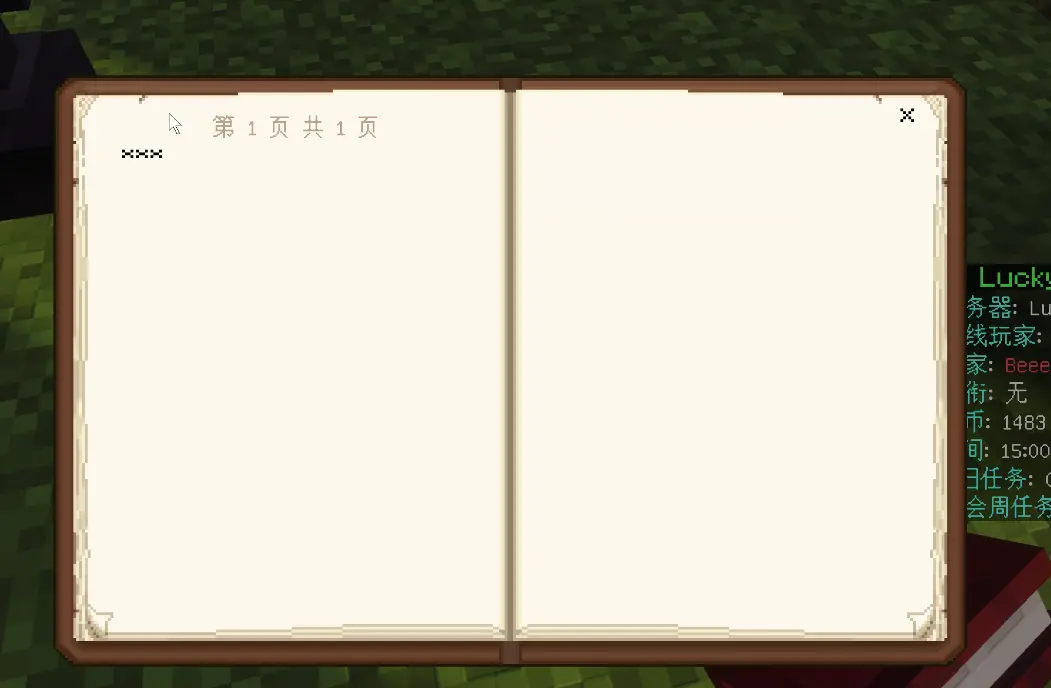
一个运行于 LeviLamina 服务端的原生文本过滤插件,负责拦截和替换玩家在游戏内提交的各类自定义文本。
## 支持内容
- 玩家聊天内容
- 普通告示牌
- 悬挂告示牌正面与背面
- 成书标题
- 成书作者
- 成书正文
- 铁砧重命名文本

## 插件特点
- 原生 C++ 实现,运行开销低
- 在文本提交阶段进行过滤
- 支持内置分类词库
- 支持自定义违禁词
- 支持白名单
- 支持自定义替换文本
- 支持大小写和全半角 ASCII 归一化
- 支持运行时配置重载
- 不依赖 LuckyClover 核心插件
- 不访问网络,词库完全随插件本地发布
- 使用 MIT License 开源
## 运行环境
- LeviLamina `26.51.x`
- Windows x64
- iListenAttentively `0.17.0` 或更高版本
## 安装方式
1. 安装与服务器版本匹配的 `iListenAttentively`。
2. 将 `LuckyClover-Moderation` 文件夹放入服务器的 `plugins` 目录。
3. 将 `config.example.json` 复制为 `config.json`。
4. 根据需要修改配置。
5. 启动服务器。
## 配置示例
```json
{
"enabled": true,
"replacement": "***",
"categories": {
"adult": true,
"political": true,
"advertising": true,
"weapons": true,
"urls": true
},
"wordListPath": "data/banned-words",
"customWords": [],
"whitelist": [],
"logMatches": true
}
```
词库目录:
```text
plugins/LuckyClover-Moderation/data/banned-words/
```
## LLSE API
如果需要过滤其他脚本插件的自定义文本,可以额外安装 `LuckyClover-Moderation-API`。
提供以下 API:
```javascript
LuckyCloverModeration.filterText(text)
LuckyCloverModeration.containsBannedWord(text)
LuckyCloverModeration.reload()
```
API 桥接插件不依赖 `LuckyClover-Plugin`,其他 LLSE 插件可以通过 `ll.imports` 调用。
## 下载
GitHub:
当前版本:
- LuckyClover-Moderation `v0.2.12`
- LuckyClover-Moderation-API `v0.2.12`
## 注意事项
- 不要覆盖已有的 `config.json`。
- 不要将运行时配置、状态文件和日志提交到仓库。
- 如果只需要聊天、书籍、告示牌和铁砧过滤,可以不安装 API 桥接插件。
- 使用 LuckyClover 系列插件的自定义文本过滤功能时,需要同时安装 `LuckyClover-Moderation-API`。
一个运行于 LeviLamina 服务端的原生文本过滤插件,负责拦截和替换玩家在游戏内提交的各类自定义文本。
## 支持内容
- 玩家聊天内容
- 普通告示牌
- 悬挂告示牌正面与背面
- 成书标题
- 成书作者
- 成书正文
- 铁砧重命名文本
## 插件特点
- 原生 C++ 实现,运行开销低
- 在文本提交阶段进行过滤
- 支持内置分类词库
- 支持自定义违禁词
- 支持白名单
- 支持自定义替换文本
- 支持大小写和全半角 ASCII 归一化
- 支持运行时配置重载
- 不依赖 LuckyClover 核心插件
- 不访问网络,词库完全随插件本地发布
- 使用 MIT License 开源
## 运行环境
- LeviLamina `26.51.x`
- Windows x64
- iListenAttentively `0.17.0` 或更高版本
## 安装方式
1. 安装与服务器版本匹配的 `iListenAttentively`。
2. 将 `LuckyClover-Moderation` 文件夹放入服务器的 `plugins` 目录。
3. 将 `config.example.json` 复制为 `config.json`。
4. 根据需要修改配置。
5. 启动服务器。
## 配置示例
```json
{
"enabled": true,
"replacement": "***",
"categories": {
"adult": true,
"political": true,
"advertising": true,
"weapons": true,
"urls": true
},
"wordListPath": "data/banned-words",
"customWords": [],
"whitelist": [],
"logMatches": true
}
```
词库目录:
```text
plugins/LuckyClover-Moderation/data/banned-words/
```
## LLSE API
如果需要过滤其他脚本插件的自定义文本,可以额外安装 `LuckyClover-Moderation-API`。
提供以下 API:
```javascript
LuckyCloverModeration.filterText(text)
LuckyCloverModeration.containsBannedWord(text)
LuckyCloverModeration.reload()
```
API 桥接插件不依赖 `LuckyClover-Plugin`,其他 LLSE 插件可以通过 `ll.imports` 调用。
## 下载
GitHub:
当前版本:
- LuckyClover-Moderation `v0.2.12`
- LuckyClover-Moderation-API `v0.2.12`
## 注意事项
- 不要覆盖已有的 `config.json`。
- 不要将运行时配置、状态文件和日志提交到仓库。
- 如果只需要聊天、书籍、告示牌和铁砧过滤,可以不安装 API 桥接插件。
- 使用 LuckyClover 系列插件的自定义文本过滤功能时,需要同时安装 `LuckyClover-Moderation-API`。

