
圈点金粒,没金粒的自己去Github或者用lip


[MD] # ContainerSorted   Minecraft 基岩版服务器(BDS) 容器(背包、箱子)整理插件 ## 安装 ### 使用 Lip ```sh lip install github.com/LeafKnife/ContainerSorted ``` ### 手动安装 1. 下载最新版本。 2. 解压`ContainerSorted-windows-x64.zip`文件。 3. 将`ContainerSorted`文件夹复制到 BDS 安装目录下的 plugins 文件夹中。 ## 使用 使用指定物品(木棍), 点击容器(箱子、末影箱、潜影盒、木桶、船箱、运输矿车)指定格子,即可自动整理/转移。 - 背包最后一格:整理背包 - 容器第一格:整理容器 - 容器第二格:将背包中所有物品转移到容器内 - 容器第三格:将容器内所有物品转移到背包中 - 容器第四格:放入部分物品(容器内已有物品) - 容器第五格:取出部分物品(背包中已有物品) 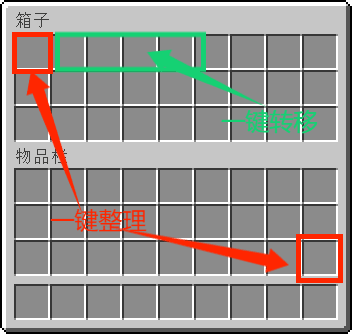 ## 更新日志 查看 [CHANGELOG](https://github.com/LeafKnife/ContainerSorted/blob/main/CHANGELOG.md) 文件获取更多信息。 ## 贡献 如果您有任何问题,请开启一个 [issue](https://github.com/LeafKnife/ContainerSorted/issues) 来讨论 欢迎 PR ## 许可 GPL-3.0 © LWenK [/MD]
[MD] # ContainerSorted   Minecraft 基岩版服务器(BDS) 容器(背包、箱子)整理插件 ## 安装 ### 使用 Lip ```sh lip install github.com/LeafKnife/ContainerSorted ``` ### 手动安装 1. 下载最新版本。 2. 解压`ContainerSorted-windows-x64.zip`文件。 3. 将`ContainerSorted`文件夹复制到 BDS 安装目录下的 plugins 文件夹中。 ## 使用 使用指定物品(木棍), 点击容器(箱子、末影箱、潜影盒、木桶、船箱、运输矿车)指定格子,即可自动整理/转移。 - 背包最后一格:整理背包 - 容器第一格:整理容器 - 容器第二格:将背包中所有物品转移到容器内 - 容器第三格:将容器内所有物品转移到背包中 - 容器第四格:放入部分物品(容器内已有物品) - 容器第五格:取出部分物品(背包中已有物品)  ## 更新日志 查看 [CHANGELOG](https://github.com/LeafKnife/ContainerSorted/blob/main/CHANGELOG.md) 文件获取更多信息。 ## 贡献 如果您有任何问题,请开启一个 [issue](https://github.com/LeafKnife/ContainerSorted/issues) 来讨论 欢迎 PR ## 许可 GPL-3.0 © LWenK [/MD]



